
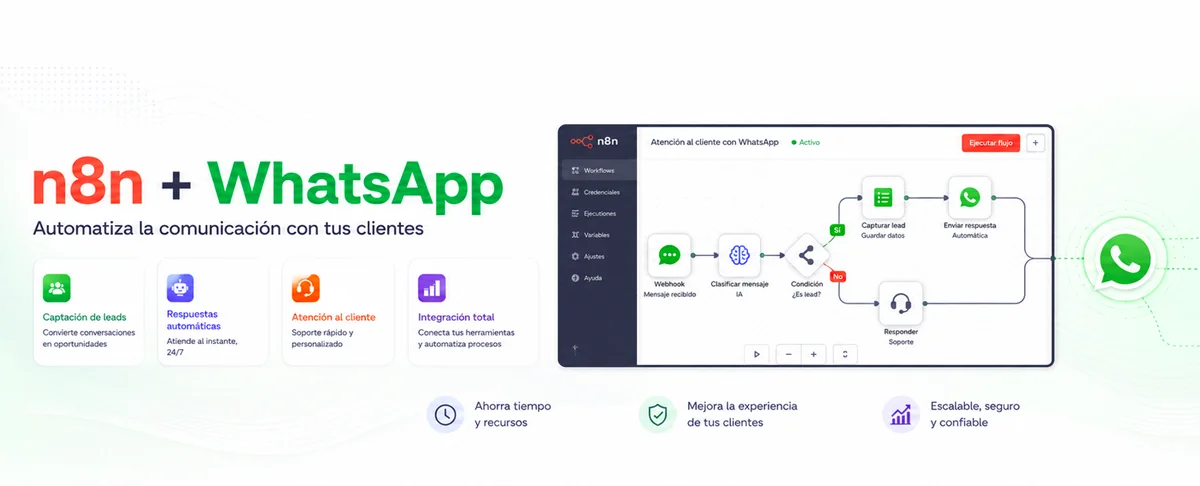
The conversation is already happening; the challenge is turning it into a process
For many companies, WhatsApp is already one of the most active customer touchpoints. Sales questions, support requests, appointment confirmations, receipts, incidents and order enquiries all arrive there. Getting customers to use the channel is not the problem. What happens next is: someone has to read each message, understand it, search another system, reply and record the outcome.
When that sequence depends on copying and pasting, the operation scales badly. Work is duplicated, context disappears between shifts, response times increase and it becomes difficult to explain why a conversation was left unanswered. Useful information ends up scattered across a phone, a CRM, an ERP, a spreadsheet and someone’s memory.
Connecting WhatsApp to n8n makes it possible to treat each message as a business event. The goal is not to build a bot that answers everything. It is to create a workflow that receives the event, identifies the customer, queries the right systems, applies rules, uses AI where it adds value and hands the case to a person when automation should not decide.
That distinction matters. Automating the channel without connecting the process only speeds up isolated replies. Integrating WhatsApp with CRM, ERP, ticketing, payments or internal data turns a conversation into a traceable operation.
What happens between “hello” and a useful answer
A robust integration usually has five parts. The first is WhatsApp Business Platform, commonly through Cloud API—not the personal WhatsApp app or automation that controls a browser. The second is an inbound event received through the WhatsApp Trigger or a webhook. The third is n8n, which normalizes data and coordinates decisions. The fourth is the company’s business systems. The fifth is the response sent through the WhatsApp Business Cloud node or, when an operation is not supported, an authenticated HTTP Request.
The basic journey looks like this:
- A customer sends a message to the business number.
- Meta creates an event and delivers it to the configured endpoint.
- n8n starts an execution and extracts fields such as message ID, phone number, timestamp, content type and text.
- The workflow queries a CRM, ERP, help desk or database.
- Rules determine whether to reply, request information, perform an action or hand over the conversation.
- The result is logged and a response is sent on WhatsApp.
n8n provides a WhatsApp node for sending messages, templates and media, as well as a trigger for reacting to events. The n8n WhatsApp credentials documentation distinguishes the credentials used by the action node from the trigger’s OAuth2 connection. Review it while implementing because Meta’s interface, permissions and review process can change.
The key should not be a phone number in isolation, but a resolvable identity. The relationship might be represented as:
wa_id → contact_id → customer_id.
This connects a conversation to the correct account, orders, open tickets and consent preferences. If the match is ambiguous, the workflow should verify it before revealing information or making a change.
Make these decisions before opening the canvas
The first step is not adding nodes. It is defining a narrow use case. “Automate customer service” is too broad. “Provide order status and hand delivery incidents to an agent” can be designed, tested and measured.
You also need to assemble the required assets and data:
- A Meta business account and portfolio, an app configured for WhatsApp and a valid number for the operation.
- The WhatsApp Business Account and phone identifiers, plus access credentials managed as secrets.
- An n8n instance available over HTTPS. For a self-hosted instance behind a proxy, the public webhook URL must be configured correctly.
- API access to the CRM, ERP, help desk or other system involved.
- Approved templates for scenarios in which WhatsApp policies require them.
- An appropriate legal basis and consent record for each type of communication.
- An operational owner for the workflow and a route to human support.
WhatsApp distinguishes user-initiated conversations from certain business-initiated messages. Depending on the context and applicable service window, an approved template may be required. Do not encode these rules as a permanent assumption. Keep them aligned with the current WhatsApp Business Platform documentation, the use case and the company’s operating country.
During development, n8n separates test and production webhook URLs. The test URL listens for events while a workflow is being built; the production URL is used with the published workflow. This separation, described in the Webhook node documentation, prevents an integration that works in a temporary test session but stops when activated.
Build a workflow that can fail without losing control
A good workflow is not a long chain of connected nodes. It is a set of stages with clear responsibilities. For an initial two-way workflow, a practical structure is:
- Receive and validate. Capture the event, confirm that it contains a processable message and retain the original identifier.
- Prevent duplicates. Query an idempotency store. If the
message_idwas already handled, finish without repeating an action. - Normalise. Convert the external payload into a stable internal schema:
conversation_id,customer_id,channel,message_type,text,received_atandcorrelation_id. - Resolve identity. Look up the phone number in the CRM. If it does not exist, create a provisional lead or ask for the minimum required information, according to policy.
- Classify intent. Apply deterministic rules first for frequent commands. Use an AI model for variable language only when it returns a controlled structure.
- Query or execute. Retrieve ERP data, create a ticket, book an appointment or update an opportunity.
- Apply controls. Validate permissions, status, availability and limits before confirming an action.
- Reply or hand over. Send an appropriate message or create a task for an agent with full context.
- Record. Store the result, latency, route taken, system queried and reason for any error.
Normalization decouples the process from Meta’s exact payload. If the payload changes, the initial adapter is updated instead of every downstream node. A correlation_id tracks the same case across WhatsApp, n8n, CRM and ERP, which is essential when an incident crosses several systems.
For fast responses, the webhook should acknowledge receipt without waiting for heavy operations. Document processing, slow ERP requests or AI inference can continue in a subworkflow. If a dependency fails, retry only safe operations, use incremental backoff and send persistent failures to a reviewable error path.
From “where is my order?” to a complete operation
Consider a distributor that receives delivery questions over WhatsApp. A customer writes, “Hi, when will order 4821 arrive?” The objective is not to generate a plausible response. It is to query the right order and return authorized data.
The workflow could run as follows:
- WhatsApp Trigger receives the message.
- Edit Fields creates the internal schema and removes unnecessary fields.
- A CRM query finds the contact by
wa_idand retrieves the customer identifier. - A classifier returns controlled JSON, such as
{"intent":"order_status","order_ref":"4821","confidence":0.94}. This is only an example output, not a claim about model quality. - An IF node checks that a reference exists and that the intent is eligible for automation.
- An ERP request looks up the order using both
order_refandcustomer_id. This double condition prevents exposing information to another customer who happens to know an order number. - A Code or Edit Fields node converts internal codes such as
OUT_FOR_DELIVERYinto clear language without allowing the model to invent a status. - The WhatsApp Business Cloud node sends the answer.
- Finally, the CRM records the interaction and the observability store records route and latency.
If the order is delayed, the workflow can open a ticket and respond that logistics will review it. If the reference is not found, it requests a correction. If the customer sends a voice note, an approved service can transcribe it, retain only the required text and run the same process. If the customer requests an address change after the parcel is out for delivery, a business rule should hand the case over; AI should not bypass a logistics policy.
This example shows where AI is useful. It can classify natural language, extract a reference or summarize context for an agent. It should not be the source of the order status or execute a sensitive operation without validation. The ERP owns operational truth; n8n orchestrates; AI interprets; a person handles exceptions.
Once connected, WhatsApp stops being an island
The same pattern supports other processes without rebuilding the integration:
- Sales: qualify an enquiry, enrich the lead, assign it by territory and create an opportunity in the CRM.
- Appointments: show available slots, book, confirm and manage reminders or cancellations.
- Support: identify product and severity, retrieve knowledge articles, open a ticket and transfer the history.
- Collections: send a due-date notice with the appropriate template and consent, create a payment link and reconcile the result; never collect payment credentials in chat.
- Field operations: receive photos or documents, attach them to a work order and notify the responsible team.
- After-sales: collect structured information, register a return and update the customer at every status change.
The key is to share components. One subworkflow can resolve identity, another can apply consent rules, another can build a safe response, and another can record the audit trail. This stops each team from creating separate logic for the same customer.
Measure work avoided, not messages sent
Message count is a volume metric, not a value metric. To evaluate operational impact, measure the following before and after deployment:
- Time to the first useful response, not to an automated greeting.
- Average resolution time by intent.
- Percentage of eligible requests resolved without intervention.
- Percentage and reason for human handovers.
- Integration errors, retries and duplicate events.
- Cases reopened because the response did not resolve the need.
- SLA attainment by schedule, language and customer type.
- Operating cost per resolved case, including platform, inference and supervision.
Potential time savings can be estimated without promising universal results:
hours avoided = automatically resolved cases × manual minutes per case ÷ 60
New work must also be included: exception reviews, maintenance, response evaluation and template updates. A workflow that saves agent time but creates follow-up corrections may be moving cost rather than removing it.
Traceability improves decision-making. If every execution records intent, result and handover reason, the team may discover that many enquiries come from a missing field in the customer portal, a recurring ERP delay or a confusing policy. Automation then becomes a sensor for the process, not just an answering system.
Production starts where the demo ends
The main risks do not come from connecting two nodes. They come from running the integration for months.
Security and privacy. Tokens and secrets belong in protected credentials, not in nodes, expressions or exported files. Apply least privilege, rotation, encryption in transit, retention policies and data minimization. Logs should not indiscriminately retain messages, documents or personal identifiers. For sensitive actions, verify identity with a mechanism proportionate to the risk, and never request passwords, card details or secrets in chat.
Authenticity and idempotency. Validate the origin of events through supported mechanisms and retain every message identifier. Webhooks may be delivered more than once and retries are normal. Creating duplicate tickets—or duplicate charges—because the workflow did not deduplicate is a design failure.
Maintenance. Version workflows, separate development from production, document credentials and dependencies, and test changes with representative payloads. Templates, permissions, API versions and nodes evolve. Review the WhatsApp Business Cloud node documentation before significant changes.
Availability and scale. Define timeouts, retries with backoff, circuit-breaker behavior for degraded dependencies and a recovery path. At higher volumes, n8n can separate event reception from execution with workers and queue mode; its scaling guide should be evaluated against actual load. Do not choose architecture by intuition: test concurrency, ERP latency and inbound peaks.
AI quality. Require structured outputs, restrict the tools available to an agent, validate every parameter and set confidence thresholds. Evaluate with anonymized real conversations. A fluent answer can still be wrong; pricing, inventory, contracts and status data must come from an authorized system.
Human oversight. Define which cases must never be automated, which signals force a handover and who receives it. The human agent needs the summary, data queried, actions already taken and history—not just the latest message.
Start small, but design to learn
A responsible deployment can start with one high-volume, low-risk intent. First run in observation mode: the workflow classifies and proposes, but a person responds. Then enable automatic replies for deterministic scenarios. Add actions later, with controls and metrics in place.
Before activation, verify that the number, app and permissions are production-ready; the public webhook works; required templates are approved; consent is recorded; identity is checked; events are deduplicated; errors have an owner; logs follow retention rules; human handover includes context; and the team can disable the workflow without losing conversations.
Connecting WhatsApp to n8n creates value when it removes steps while preserving control. If your company wants to move from isolated conversations to a process integrated with CRM, ERP, APIs and AI, Digitalcube.ai can help define the use case, design the architecture, implement the workflow and establish the metrics needed to decide how it should scale.