
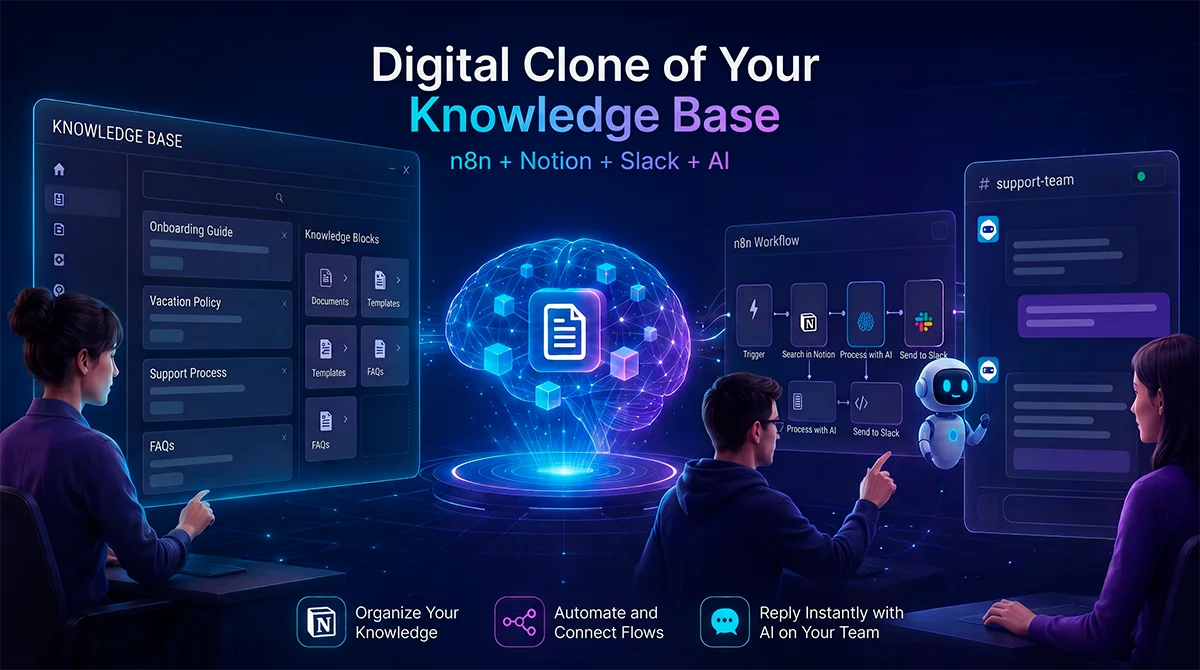
All of your company's information, accessible to any employee in 2 seconds from Slack.
In a hurry? Don't read the article. If you know your way around n8n, copy it yourself onto your own servers.
The problem: your documentation exists, but nobody can find it
Almost every company we work with shows the same pattern. Internal documentation exists: vacation policies, onboarding manuals, purchasing processes, security guidelines. It lives in Notion, in Google Drive, in some wiki somebody set up with the best of intentions. And still, the same questions come up in Slack every single week: how many vacation days do I have, how do I request a laptop, what do I do if I lose my company phone.
The cost isn't just the asker's time. It's the responder's: usually the two or three people in People, IT or Operations who act as the organization's human search engines. Every interruption is a context switch, and answers given from memory don't always match the current version of the document.
The native search in these tools doesn't solve this, because it requires knowing which exact words the document's author used. An employee asking "I lost my laptop, what do I do?" will never find a page titled "Security and Access Guidelines". Keyword search fails precisely where it's needed most: when the question and the document share no vocabulary.
What follows is the complete recipe for the workflow that solves this. Not a high-level overview: the step-by-step with every technical decision justified, the exact production prompt, and the JSON so you can import it into your n8n this afternoon.
The architecture: RAG over your own documentation
The system is a RAG (Retrieval-Augmented Generation) implementation with two independent branches inside a single n8n workflow:
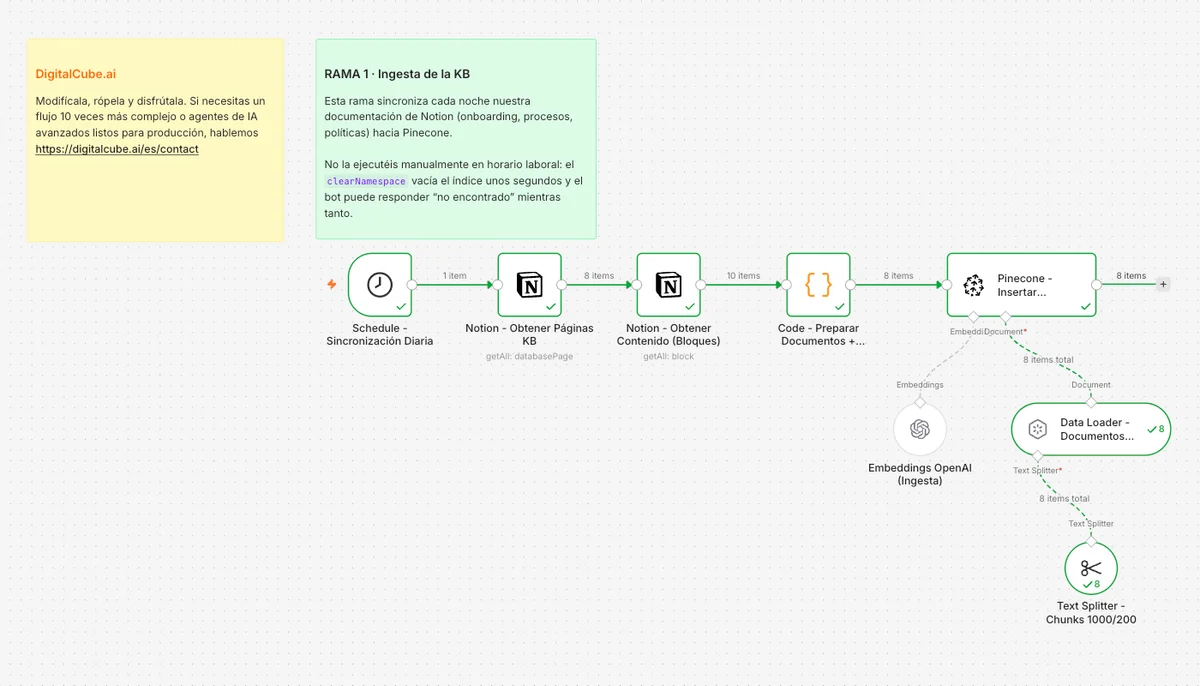
Branch 1, ingestion. Every night, the workflow reads all pages from the Notion database where the documentation lives, extracts their content as text, splits it into chunks and converts them into numerical vectors (embeddings) stored in a vector database: Pinecone in our version, although Qdrant or Supabase with pgvector work with minimal changes.
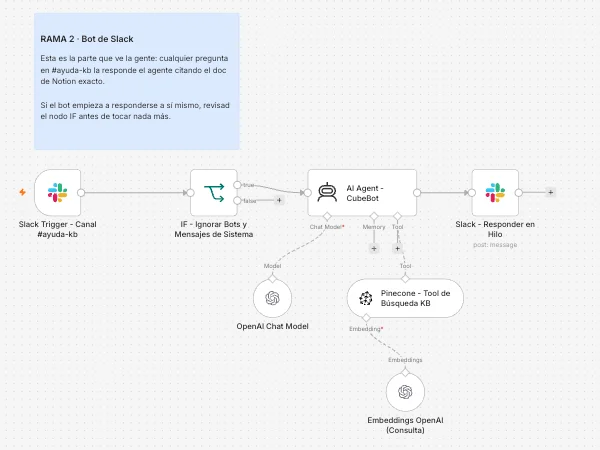
Branch 2, the bot. When an employee posts in a specific Slack channel, an AI agent converts the question into a vector, retrieves the semantically closest chunks from the vector database, writes an answer using only that context, and posts it in the message thread, citing the source Notion document with a direct link.
The key word is "semantically". Embeddings capture meaning, not keywords. "I lost my laptop" and "in case of theft or loss of corporate devices" end up close together in vector space even though they share no terms. That is the qualitative leap over Notion's built-in search.
The second important design decision: the bot always cites its source. Every answer ends with a link to the exact Notion page the information came from. This turns the bot from an opaque oracle into a verifiable index, and it is what makes the team trust it.
The step-by-step, omitting nothing
1. The nightly sync. A Schedule Trigger runs ingestion at 02:00, when nobody is asking questions and the team has finished editing documentation. A Notion node retrieves all pages from the Knowledge Base database, and a second Notion node downloads each page's content blocks, nested ones included. A prerequisite that costs a full afternoon to anyone who doesn't know it: the Notion integration sees no pages by default; you must explicitly share the database with it from the connections menu.
2. Document preparation. A Code node groups blocks by page and builds one document per page, attaching metadata: title, Notion URL and last-edited date. This metadata is the most important piece of the whole system, because it is what later allows citing the exact source. A RAG pipeline without source metadata produces answers that are impossible to audit.
3. Chunking and vectorization. A recursive text splitter divides each document into 1,000-character chunks with 200 characters of overlap. We tried 500 and the model lost context in long manuals; at 2,000, answers dragged in irrelevant content. Chunks are vectorized with OpenAI's text-embedding-3-small (dimension 1536, marginal cost) and inserted into a dedicated namespace in the Pinecone index. We clear the namespace on every sync: we prefer rebuilding the index nightly over dragging along chunks of already-deleted documents. Incremental sync is an optimization that only pays off at large volumes.
4. The bot's trigger. A Slack Trigger listens to messages in a single designated channel, for example #kb-help. Restricting it to one channel is deliberate: a bot that chimes in on every company conversation is a bot that ends up muted.
5. The most important node in the workflow. An IF node discards any message carrying a bot_id or a subtype. Without this filter, the bot reads its own reply as if it were a new question and enters an infinite self-reply loop. It is the classic failure mode of this architecture and the first one to prevent. Related: the Slack credential must use the bot token (xoxb), not the user token (xoxp); with a user token, replies are published under your own name and may not carry a bot_id, weakening this very filter.
6. The agent and its tool. An AI Agent receives the question, running GPT-4o at temperature 0.2. The vector store is attached as a tool in retrieve-as-tool mode with topK 5: with 3 chunks it left information out, with 10 the context filled with noise. A detail that throws no error but silently breaks everything: the query-side embedding model must be exactly the same as the ingestion-side one. If they differ, retrieval returns poor results with no warning whatsoever.
7. The prompt. Full transparency: this is the system prompt we run in the agent, exactly as it is in production.
You are the assistant for the company's internal Knowledge Base. Your
only source of truth is the `knowledge_base` tool, which searches the
vectorized internal documentation (Notion: onboarding manuals,
processes, policies, guides).

Rules:
1. ALWAYS use the `knowledge_base` tool before answering. Never answer
   from memory.
2. Answer in the same language as the question, clearly and concisely.
3. ALWAYS cite the exact source: every tool result includes
   `source_title` and `source_url` metadata. End your answer with a
   `Sources:` section listing each document used as a Slack link in
   <URL|Title> format.
4. If the information is not in the knowledge base, say so honestly:
   "I could not find this in the internal documentation" and suggest
   who to ask. Do NOT invent answers.
5. Format for Slack: use *bold*, bullet lists and code blocks where
   appropriate. Do not use Markdown headers (#).
6. If the question is ambiguous, answer as best you can with what was
   found and note what detail would help narrow the search.
Rule 4 is what separates a useful assistant from a problem generator. An internal bot that invents an expense policy is worse than no bot at all. Forbidding answers from memory and forcing it to admit ignorance are the two least negotiable instructions in the prompt.
8. The reply. The agent posts in the original message's thread, never in the main channel. The channel stays readable and every question keeps its answer and sources in a self-contained context.
What else can be connected
The same architecture accepts additional sources without touching the bot branch. For Google Drive, you duplicate the ingestion branch with the Drive node and a text extractor pointing at the same vector index. Onboarding manuals in PDF, meeting notes, technical documentation: anything that can be turned into text with a source URL can enter the knowledge base. The agent doesn't care where each chunk came from; it only sees text and metadata.
It also works in the opposite direction: the same agent-with-vector-search pattern serves customer support over product documentation, lets sales teams query technical specifications, or acts as a query layer over your ERP if you vectorize its process documentation.
Benefits you can actually measure
We won't promise made-up percentages. What you can measure in your own organization, before and after:
- Volume of repetitive questions reaching People, IT and Operations via direct message, and how many the bot's channel absorbs.
- Time to first answer: from minutes or hours depending on someone's availability, to seconds.
- Traceability: every answer links to the current document, eliminating the drift between "what gets answered from memory" and "what the current policy actually says".
- Gap detection: the questions the bot cannot answer are a prioritized list of the documentation you still need to write. It is the system's most valuable side effect.
- Onboarding scalability: every new hire gets a channel to ask in without the friction of interrupting anyone.
Risks and considerations before production
Security and index scope. Everything you vectorize becomes accessible to anyone with access to the channel. Do not index documentation containing salary information, personal data or restricted material, or segment by namespaces with separate channels per access level. Also review which provider processes the text: chunks travel to the embedding model's and the LLM's APIs.
Data quality. The bot is only as good as the documentation it indexes. Stale pages produce stale answers delivered with complete confidence. The nightly full rebuild mitigates the problem, but does not replace periodic content review.
Human oversight. During the first weeks, someone on the team should review the answers in the channel. The prompt reduces hallucinations, it does not eliminate them: this is a probabilistic system and must be treated as such.
Maintenance and dependencies. The system depends on four external services: Notion, Slack, OpenAI and the vector database. Any API or schema change in Notion (something as simple as renaming the title property) can degrade ingestion. Budget for maintenance, not just for the build.
Operating cost. With a typically sized KB, the dominant cost is the answering LLM, not the embeddings. It is worth monitoring cost per question before opening the channel to the whole company.
Now it's yours
The downloadable JSON contains the complete workflow: both branches, the anti-loop filter, the prompt and configuration notes on every node. If you have a running n8n and a free afternoon, you don't need us.
If you'd rather have it work on the first try, adapted to your real sources, with permission segmentation properly solved and without discovering the silent failure modes along the way, that is exactly what we do at DigitalCube.ai: AI automation on top of the systems you already use. Write to us and we'll build it with you.