
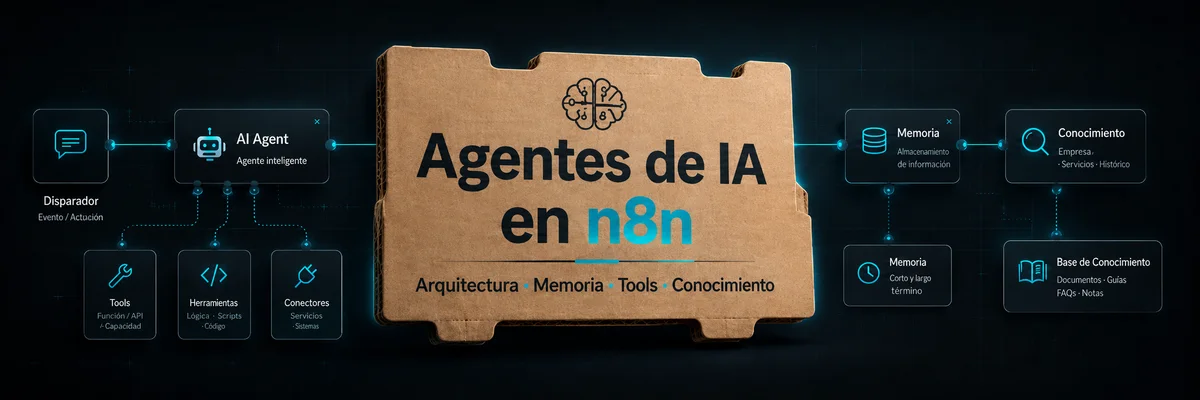
AI Agents in n8n: Architecture, Memory, Tools and Knowledge Bases
Artificial intelligence nodes in n8n make it possible to build workflows that do more than move data between applications. They can interpret text, classify information, generate responses, consult knowledge, call tools and make dynamic decisions.
Within this category, AI agents occupy a special place. An agent should not be understood as a simple chatbot. In n8n, an AI agent can act as an orchestrator capable of receiving an instruction, analysing the context, deciding which tools it needs, consulting external data and returning a response or executing actions within the workflow.
The difference between classic automation and automation with agents lies in the level of autonomy. In a traditional workflow, the designer defines every step: first an API is queried, then a field is transformed, then a condition is evaluated and finally a notification is sent. In a workflow with an agent, part of the decision-making can be delegated to the model: the agent interprets the request and decides which tool to use to achieve the objective.
This does not mean that the agent should have total freedom. In production environments, the real value appears when reasoning capabilities are combined with clear limits, well-defined tools, reliable data, controlled memory and structured outputs.
1. AI nodes in n8n
n8n’s AI nodes are organised around a modular architecture. Instead of configuring everything inside one large node, n8n allows a main node to be connected with specialised subnodes.
This way of working is especially visible in agents. An AI Agent can be connected to a language model, memory, a set of tools, an output parser, vector databases, retrievers or other auxiliary components.
The main types of components that appear in AI workflows are:
- language models;
- chat models;
- chains;
- agents;
- memory;
- tools;
- document loaders;
- text splitters;
- embeddings;
- vector stores;
- retrievers;
- output parsers;
- agents used as tools.
Each component has a different responsibility. The model generates language and reasons. Memory preserves conversational context. Tools allow the system to act on external systems. Embeddings convert text into vectors. The vector store stores semantic knowledge. The retriever retrieves relevant information. The output parser converts the response into a structure that can be used by other nodes.
This separation is important because it makes it possible to design clearer and more auditable AI systems.
2. Chains versus agents
Before going deeper into agents, it is useful to distinguish between chains and agents.
Chains
A chain is a relatively predictable sequence of operations around a language model. It usually receives an input, applies a prompt, calls a model and returns an output.
Chains are suitable when the task is well defined and the decision flow is controlled by the workflow designer.
Examples of use:
- summarising a document;
- classifying an email;
- extracting entities;
- converting free text into JSON;
- detecting sentiment;
- generating a product description;
- rewriting a message;
- translating content;
- drafting a standard response.
The advantage of a chain is control. It is known which model is called, which prompt is used and what type of output is expected.
Agents
An agent is more dynamic. It receives an instruction, interprets the objective and can decide which tool to use. Instead of being limited to generating a response, it can consult external information, call an API, review a database, perform calculations or delegate a task.
Examples of use:
- answering questions by consulting an internal knowledge base;
- analysing a lead and updating a CRM;
- reviewing a support ticket and proposing a response;
- checking the status of an order;
- generating a report from several sources;
- deciding whether a request requires human intervention;
- searching data in a vector database and building a response;
- calling specialised subworkflows.
Agents are suitable when the task requires dynamic decision-making. However, that flexibility introduces risks. The more tools an agent has, the more important it becomes to define limits, permissions, instructions and validations.
3. AI Agent as an orchestrator
The AI Agent node functions as the decision centre of an AI workflow. Its role is not simply to generate text, but to coordinate different resources.
A typical agent receives:
- an input from the user or another node;
- a system message with instructions;
- a chat model;
- available tools;
- conversational memory;
- access to knowledge;
- formatting restrictions;
- iteration limits.
Based on these elements, it decides how to respond or which steps to execute.
For example, a user may ask: “What was this customer’s latest order and what open issue do they have?” A classic workflow would have to explicitly define each step: extract the customer, query orders, query incidents, combine results and draft a response.
An agent can receive tools such as “check orders” and “check incidents”, decide to use both, interpret the results and build a final response. The designer does not remove the logic, but encapsulates it in controlled tools and lets the agent select when to use them.
This pattern is useful for internal assistants, support systems, commercial automation, data analysis, operations and processes where requests do not always follow the same path.
4. Language model
The language model is the central component of the agent. Without a connected model, the agent cannot interpret the request or decide what to do.
The choice of model directly affects:
- reasoning quality;
- cost per execution;
- latency;
- context size;
- ability to use tools;
- output format consistency;
- language support;
- privacy and compliance;
- behaviour when facing complex instructions.
For simple tasks, such as classifying messages or generating brief summaries, a fast and economical model may be enough. For more complex tasks, such as technical analysis, reasoning across multiple sources or intensive tool use, it is advisable to use more robust models.
It is also important to consider the available context. An agent that must work with long histories, extensive documents or multiple tool results needs a model with a sufficient context window.
Criteria for choosing a model
When selecting a model for an agent in n8n, it is useful to evaluate:
- required accuracy;
- execution volume;
- acceptable cost;
- data sensitivity;
- need for low latency;
- compatibility with tool calling;
- stability of output format;
- main language of interaction;
- ease of integration with available credentials.
Not all workflows need the most powerful model. In many cases, a well-designed architecture with good prompts, limited tools and relevant data produces better results than a large model used without control.
5. System message and instructions
The system message is one of the most important pieces of the agent. It defines the role, rules, limits and way of acting.
A poor system message produces ambiguous agents. A good system message turns the agent into a more predictable operational component.
It should answer questions such as:
- what role does the agent fulfil?
- what tasks can it perform?
- what tasks must it not perform?
- when should it use tools?
- what should it do if information is missing?
- what output format should it produce?
- how should it handle sensitive data?
- when should it request human review?
- what level of detail should it include in the response?
A basic example of a system message for a support agent could be:
You are an internal technical support assistant. Your task is to analyse customer requests, consult the knowledge base when necessary and propose clear responses. Do not invent information. If you do not find an answer in the available tools, indicate that the request requires human review. Do not modify tickets or send external communications unless an explicit tool allows it.
This type of instruction limits improvisation. The agent knows what it should do, which source to consult and when to escalate.
Instructions for using tools
When an agent has tools, the system message should explain how to use them. Connecting them is not enough.
For example:
Use the document search tool before answering questions about internal policies. Use the CRM tool only when you need customer data. Do not use writing tools if the request only requires consultation. If an action may modify data, first summarise the action and request approval.
These rules help reduce unnecessary calls and improve workflow security.
6. Conversational memory
Memory allows the agent to preserve context between interactions. Without memory, each message is interpreted as an isolated request, unless the workflow manually includes the history.
In a conversational assistant, memory allows the agent to remember previous details from the conversation, such as the topic discussed, preferences mentioned, previous decisions or user clarifications.
For example:
User: “Analyse this lead.”
Agent: “It has medium priority.”
User: “And what email would you send them?”
Without memory, the second message may be ambiguous. With memory, the agent understands that “them” refers to the previous lead.
Types of memory
Different memory approaches can be used in n8n depending on the case.
Simple memory
Simple memory preserves a limited number of recent messages. It is suitable for prototypes, simple assistants and conversations where advanced persistence is not required.
Advantages:
- easy to configure;
- sufficient for many basic cases;
- low complexity.
Limitations:
- not always suitable for production;
- may lose older context;
- may introduce noise if too much history is preserved;
- does not replace a knowledge base.
Persistent memory
Persistent memory uses external systems such as databases or specialised services. It is useful when conversations need to be preserved across sessions, audited or scaled.
It can be implemented with databases such as Redis, PostgreSQL or other stores designed for conversational history.
Advantages:
- preserves information between executions;
- enables traceability;
- can be shared between workflows;
- facilitates later analysis.
Limitations:
- requires data retention design;
- involves privacy considerations;
- requires maintenance;
- may increase complexity and cost.
Advanced memory management
In more complex cases, it may be necessary to control which messages enter the context, summarise long conversations, remove irrelevant information or inject specific messages.
This is important because memory should not grow without limit. A history that is too long can increase costs, exceed the context window or degrade response quality.
Memory is not knowledge
A common mistake is to confuse memory with a knowledge base.
Memory is used to remember the conversation. The knowledge base is used to consult verifiable information.
For example, if a user says “my company is Acme”, memory may remember that detail within the conversation. But if the agent must answer what Acme’s refund policy is, it should consult a reliable knowledge source, not depend on memory.
Separating these concepts improves system accuracy.
7. Tools: the agent’s external capabilities
Tools are one of the most powerful elements of agents in n8n. A tool is a capability the agent can use to obtain information or execute an action.
A tool can be:
- an HTTP request;
- a database operation;
- a search in a spreadsheet;
- a CRM query;
- a call to a subworkflow;
- a search in a vector database;
- a calculator;
- an email tool;
- a ticketing tool;
- another specialised agent.
The idea is that the agent does not have to solve everything with the language model. If it needs external information, it should consult it. If it needs to calculate, it should use a tool. If it needs to act on a system, it should do so through a controlled tool.
Example of an agent with tools
A support agent may have these tools:
- search the knowledge base;
- consult a customer in the CRM;
- check order status;
- create a ticket;
- escalate to a human;
- draft a response.
Faced with the question “The customer says they did not receive their order”, the agent could:
- identify the customer;
- consult the CRM;
- search recent orders;
- review the logistics status;
- consult the incident policy;
- propose a response;
- create a ticket if appropriate.
The agent does not need to have all the information in the prompt. It obtains it through tools.
Tool design
A tool should have a clear responsibility. It is preferable to have several specific tools rather than one overly generic tool with excessive permissions.
For example, instead of giving the agent a tool called “manage CRM” with many operations, it may be safer to create separate tools:
- search customer;
- check opportunities;
- update note;
- create sales task.
This makes it easier to control what the agent can do and when.
Tool descriptions
The description of each tool is important. The agent uses that description to decide whether it should use it.
A poor description may make the agent ignore a useful tool or use the wrong tool.
A good description should indicate:
- what the tool does;
- what data it needs;
- what it returns;
- when it should be used;
- what limitations it has.
Example:
Use this tool to search articles in the internal knowledge base about support policies, returns, warranties and technical procedures. Do not use it to consult customer or order data.
Read-only tools and writing tools
Not all tools carry the same risk. It is useful to distinguish between read-only tools and tools that modify systems.
Read-only tools:
- consult customer;
- search document;
- retrieve order;
- list tickets;
- calculate amount.
Writing tools:
- create ticket;
- update CRM;
- send email;
- cancel order;
- modify database;
- publish content.
Writing tools should have additional controls. In many cases, human review should be required before executing irreversible or sensitive actions.
8. Human review and sensitive actions
When an agent can execute real actions, human review becomes important. An agent that only answers questions has limited risk. An agent that sends emails, modifies databases or updates tickets can have operational impact.
For sensitive actions, it is recommended to introduce approval points.
Examples:
- before sending an external email;
- before deleting or modifying data;
- before cancelling an order;
- before publishing content;
- before escalating a critical case;
- before executing financial operations.
The workflow can make the agent propose an action, but require a person to approve it before execution.
This pattern preserves the efficiency of the agent without removing human control.
9. Databases and agents
Agents can interact with databases in two main ways: through structured queries and through unstructured knowledge.
Structured databases
Structured databases contain tables, records and well-defined fields. They are suitable for information such as:
- customers;
- orders;
- tickets;
- products;
- invoices;
- users;
- metrics;
- inventory.
An agent can use tools to query these databases. For example, a tool can receive a customer email and return their recent orders.
In this type of integration, it is advisable to limit the queries the agent can execute. Giving it free access to SQL can be risky. A safer alternative is to create specific tools that execute predefined or parameterised queries.
Example:
- tool “search_customer_by_email”;
- tool “check_recent_orders”;
- tool “list_open_tickets”;
- tool “get_invoice_status”.
This reduces the risk of incorrect, slow or dangerous queries.
Unstructured knowledge bases
Many organisations have knowledge in documents, manuals, internal policies, PDFs, web pages, wikis, contracts, FAQs or transcripts. This data does not fit well into a traditional table.
For this type of information, embeddings, vector stores and semantic retrieval are usually used.
The general flow is:
- load documents;
- split them into chunks;
- generate embeddings;
- store those embeddings in a vector store;
- receive a question;
- retrieve relevant chunks;
- pass those chunks to the model;
- generate a response based on the retrieved context.
This pattern is known as retrieval-augmented generation, or RAG.
10. Vector stores and RAG
A vector store stores numerical representations of text. These representations make it possible to search by semantic similarity, not only by exact word matching.
For example, if the user asks “can I return a product after opening it?”, the system can retrieve a fragment about “return policy for used items” even if the words do not match exactly.
When to use RAG
RAG is useful when the agent needs to respond with specific and updatable information.
Typical cases:
- internal policies;
- technical documentation;
- product manuals;
- support bases;
- operational procedures;
- legal documentation;
- catalogues;
- contracts;
- reports;
- frequently asked questions.
The advantage is that knowledge is not locked inside the model. It can be updated by modifying the documents and reindexing the database.
Components of a RAG system
A RAG system in n8n usually includes:
- document loader;
- text splitter;
- embeddings;
- vector store;
- retriever;
- agent or chain;
- prompt with instructions for using the context;
- output parser if structured format is needed.
Each component affects the final quality.
Text splitters
Text splitters divide long documents into chunks. Chunk size and overlap between chunks influence retrieval.
Chunks that are too large may include noise. Chunks that are too small may lose context.
A good starting point is to test with real questions and adjust:
- chunk size;
- overlap;
- number of retrieved results;
- splitting strategy;
- format of the original document.
Embeddings
Embeddings convert text into vectors. The chosen embedding model affects the quality of semantic search.
For multilingual documents or documents in Spanish, it is advisable to choose embeddings that work well in the language of the content. Cost, speed and compatibility with the vector store should also be considered.
Retrievers
The retriever is the component that retrieves relevant chunks from the vector store. It can be configured to return more or fewer results, apply filters or use advanced strategies.
A well-configured retriever reduces hallucinations because it provides relevant context to the model. A poorly configured one may retrieve irrelevant fragments and worsen the response.
11. Output parsers and structured outputs
In automation, a natural language response is not always enough. Often the agent must return a structure that other nodes can consume.
Output parsers allow the model’s output to be converted into more predictable formats, such as JSON, lists or structures with specific fields.
Example of a structured output for classifying an email:
{
  "category": "technical_support",
  "priority": "high",
  "requires_response": true,
  "reason": "The customer reports a complete service interruption",
  "next_action": "create_urgent_ticket"
}
This output can then feed a Switch, a database, a CRM or a notification tool.
Advantages of using parsers
Parsers help to:
- reduce ambiguity;
- connect AI with traditional logic;
- validate responses;
- automate later decisions;
- avoid analysing free text;
- improve debugging.
When an agent is part of a production workflow, important responses should preferably not be just free text. Structured format makes control easier.
Parsers with self-correction
In some cases, the model may return malformed JSON or an incomplete structure. Parsers with self-correction capabilities try to repair the output so that it complies with the expected format.
This does not remove the need for validation, but it improves workflow robustness.
12. Agents as tools
An advanced architecture consists of using agents as tools for other agents. In this pattern, a main agent receives the request and delegates tasks to specialised agents.
For example:
- main agent: receives the question and decides whom to delegate to;
- financial agent: analyses invoices and payments;
- technical agent: consults product documentation;
- sales agent: reviews CRM data;
- legal agent: consults policies and contracts;
- support agent: drafts customer responses.
Each subagent can have its own model, prompt, memory and tools. This allows responsibilities to be separated and avoids a single agent having too many instructions.
Advantages of multi-agent architecture
The multi-agent approach makes it possible to:
- modularise tasks;
- reduce overly long prompts;
- specialise tools;
- improve maintenance;
- isolate permissions;
- reuse agents in different workflows;
- scale complex systems.
Risks
It also introduces additional complexity. If it is not well designed, there may be unnecessary calls, high latency, higher costs or inconsistent results between agents.
For this reason, multi-agent architecture should only be used when the complexity of the case justifies it.
13. Architecture patterns for agents in n8n
Document query agent
This pattern is used to answer questions about internal documents.
Typical architecture:
- Chat Trigger or user input.
- AI Agent.
- Chat model.
- Search tool in vector store.
- Vector store with indexed documents.
- Optional memory.
- Final response.
It is suitable for knowledge bases, internal manuals, technical documentation or corporate policies.
Operational agent with approval
This pattern is used when the agent can propose actions, but a person must approve them.
Typical architecture:
- User input.
- AI Agent.
- Consultation tools.
- Tool that prepares the action.
- Human approval node.
- Execution of the action if approved.
- Record of the result.
It is suitable for external emails, CRM changes, financial actions or processes with operational impact.
Classification agent
This pattern uses AI to categorise inputs and route workflows.
Typical architecture:
- Email, form or webhook trigger.
- Chain or AI Agent.
- Structured output parser.
- Switch according to category.
- Specific actions per branch.
It is suitable for support, sales, operations, moderation and prioritisation of requests.
Agent with data tools
This pattern allows questions to be asked about structured data.
Typical architecture:
- Conversational input.
- AI Agent.
- Specific tools to query the database.
- Output parser.
- Response with results and explanation.
It is suitable for sales analysis, internal reporting, operations and status queries.
14. Security and control
AI agents must be designed more carefully than a traditional workflow because they have decision-making capacity. Security should not be added at the end; it should be part of the design.
Limit tools
An agent should only have the tools it needs. The more tools it has, the larger the decision space and the greater the risk of incorrect use.
Separate reading and writing
It is recommended to separate consultation tools from modification tools. Writing tools should have more controls.
Validate inputs
Data that reaches the agent may contain malicious instructions, ambiguous text or incomplete information. The workflow should validate inputs whenever possible.
Validate outputs
When the agent’s output feeds other nodes, it must be validated. This is especially important if it is used to make decisions, update systems or send communications.
Record decisions
In critical processes, it is useful to store which tools the agent used, what data it received and what output it produced. This facilitates auditing and debugging.
Add human review
Irreversible, sensitive or high-impact actions should require human approval.
15. Common mistakes
Giving the agent too many tools
An agent with too many tools may take unnecessary or incorrect paths. It is better to start with a few well-described tools and expand gradually.
Using memory as a knowledge base
Memory preserves conversation, but it should not replace documents, databases or verifiable sources.
Not structuring the output
If an agent must feed later decisions, the output should be structured. Free text is harder to validate.
Not controlling sensitive actions
Allowing an agent to send emails, update records or modify data without approval can generate operational errors.
Prompts that are too vague
An agent with generic instructions will behave less predictably. The system message should be concrete and operational.
Not testing with real cases
The quality of an agent must be tested with real examples of use. Artificial tests may hide problems related to retrieval, format, ambiguity or permissions.
Conclusion
AI agents in n8n make it possible to move from linear automation to more dynamic systems, capable of interpreting requests, consulting information, using tools and producing contextualised responses or actions.
Their power depends on the components connected to them. A useful agent needs a good language model, clear instructions, well-managed memory, specific tools, controlled access to data, knowledge retrieval when necessary and structured outputs to integrate with the rest of the workflow.
The key is to treat the agent as a piece of architecture, not as a black box. It is necessary to define what it can do, what it cannot do, which tools it can use, when it should consult data, when it should escalate to a person and how it should return results.
When designed with these principles, an AI agent in n8n can become a reliable component for support, operations, sales, data analysis, internal documentation and advanced business automation.